
We are pleased to announce the introduction of remote signatures of commercial registration electronic certificate (commercial registration remote signatures)
- Published:
For the latest detailed information, please check the Ministry of Justice website " Commercial Registration Remote Signatures Special Page ".
From July 2026, Ministry of Justice and Digital Agency plan to introduce a remote signing method for the commercial registration electronic certificate in cooperation with gBizID. This will make it possible to grant digital signatures online using the gBizID app on smartphones. It will also make it possible to prepare for the issuance of electronic certificate and manage it on a browser-based website. The signing key (*) and commercial registration electronic certificate required for digital signatures will change from a file-based format to a secure cloud-based format. The background to the introduction is the resolution of issues related to usage environments and security in the current local signing method (file-based format). The changes and Q & A following the introduction are as follows.
*A signature key is an encryption key (private key) held only by a principal for creating an electronic signature. By signing a document using this key and verifying it with the corresponding public key, it is possible to confirm that the document has not been tampered with and that the signature is made by the principal.
Table of Contents
- Background to the introduction of the remote signature method
- What Will Change with the Introduction of Remote Signature?
- How Remote Signing Works
- Instructions on how to sign using the remote signature method
- Q&A
- Reference Information
1. Background of the introduction of the remote signature method
Commercial registration electronic certificate is a electronic certificate that certifies that users are representatives of companies and corporations through online applications for administrative procedures and electronic contracts between companies and corporations. It has the same function as a paper certificate of the seal impression of a company or corporation. Electronic signatures using commercial registration electronic certificate are currently based on a method called local signature, and can be broadly divided into the following two forms.
- File form: A form in which a signature key and a commercial registration electronic certificate are stored in a computer in the form of a file
- IC card format: Signature key and commercial registration electronic certificate are stored in security chips such as IC cards so that they cannot be retrieved from outside.
Among them, 1. The following issues are related to the file format. The remote signature method is introduced to solve these issues in the file format.
- Problems due to limited usage environment
Since signing keys are stored as electronic certificate files in the form of files on users' PCs, the environments in which procedures can be performed are limited. For example, if a electronic certificate file is stored on an office PC and a user goes on a business trip, the user cannot sign the file unless he or she brings the PC with him or her. - Security Challenges
Because electronic certificate files can be duplicated, proper management can be difficult. If not managed properly, electronic certificate files containing signing keys and their passwords can be exposed and used by third parties.
2. What Will Change with the Introduction of Remote Signature?
The following points are changed by the introduction of the remote signature method.
- Changes in the Form of Storage of Signature Keys and Commercial Register electronic certificate
- Signing keys are no longer stored in the form of electronic certificate files on user PCs. Instead, they are stored on cloud hardware that is under strict control, thus improving security.
- The preparation and management of electronic certificate publication can be done through a browser, which reduces the management burden on users.
- Digital Signatures Now Available Online
- Restrictions on the usage environment will be eliminated, and it will be possible to do it online from anywhere through smartphones, etc.
- Cooperation with gBizID
- Users must obtain a gBizID account.
- You will be able to authorize signatures (approve the granting of electronic signatures) in the gBizID app on your smartphone.
3. Mechanism of Remote Signature Granting
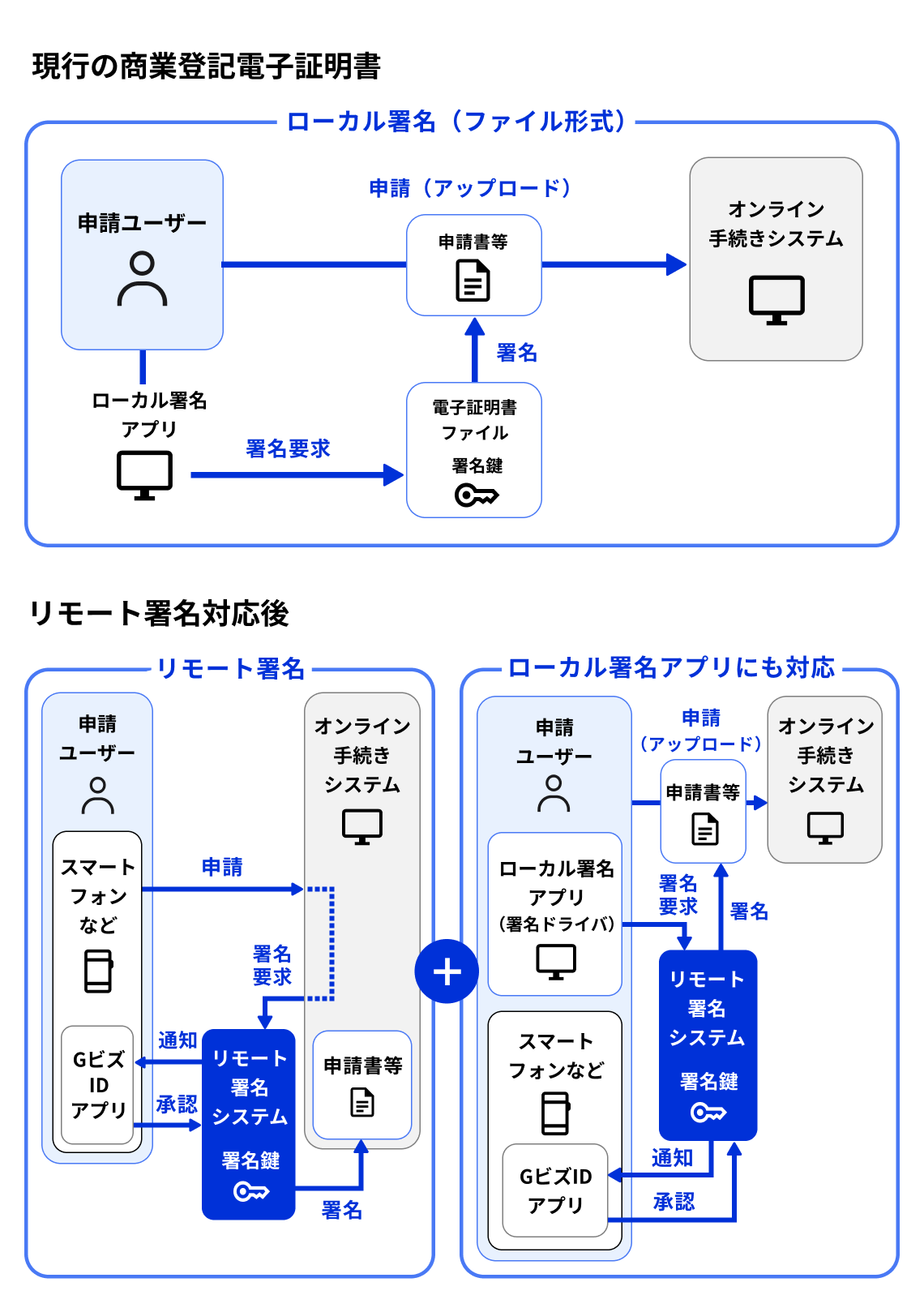
I will explain the flow of granting electronic signatures using commercial registration electronic certificate by comparing the current flow and the future flow. Both assume the situation where electronic signatures of commercial registration electronic certificate are granted to applications, etc. to be submitted in online administrative procedures. After the introduction of the remote signing method, there are two methods: "remote signing" and "signing compatible with local Signature App." For details, please check the following.
- Current case
- The requesting user shall attach a digital signature to the application form, etc. using a separate Local Signature App (software for local environments). As a specific technical mechanism at this time, Local Signature App shall attach a digital signature to the application form, etc. using the signature key of the electronic certificate file stored in the form of a file on the computer.
- Finally, the applicant user uploads the application form and other documents with the electronic signature to the online procedure system and submits them.
- In the future (after introduction of remote signature method)
- Remote signing only
An applying user selects an application form, etc. to which an electronic signature is to be granted and grants an electronic signature through the Online Procedure System. As a specific technical mechanism for this process, the Online Procedure System issues a signature request (a request to "please sign") to the remote signing system. Upon receiving the request, the remote signing system grants an electronic signature online using the applying user's signature key on the cloud, after obtaining approval from the applying user's gBizID app. Since the signature key is stored on the cloud, the granting of an electronic signature is completed online without using the Local Signature App. - Remote signing for local Signature App
- Even after the introduction of the remote signing system, we will provide a signing driver that supports the remote signing method in order to make it possible to grant digital signatures using the local Signature App in the same way as before.
- When using a signature driver, an applying user shall open the Local Signature App and grant a digital signature to an application form, etc. However, in this case, unlike the current system, a request for signatures from the Local Signature App shall be made to the remote signature system through the signature driver. Then, the applying user shall upload the application form, etc. to which the digital signature has been granted to the online procedure system and submit it.
- Remote signing only
Please refer to the diagram below, which shows the above information.
4. Instructions on how to sign using the remote signature method
Here is an example of how to sign the commercial registration electronic certificate under the remote signing method. Signing is completed in two steps.
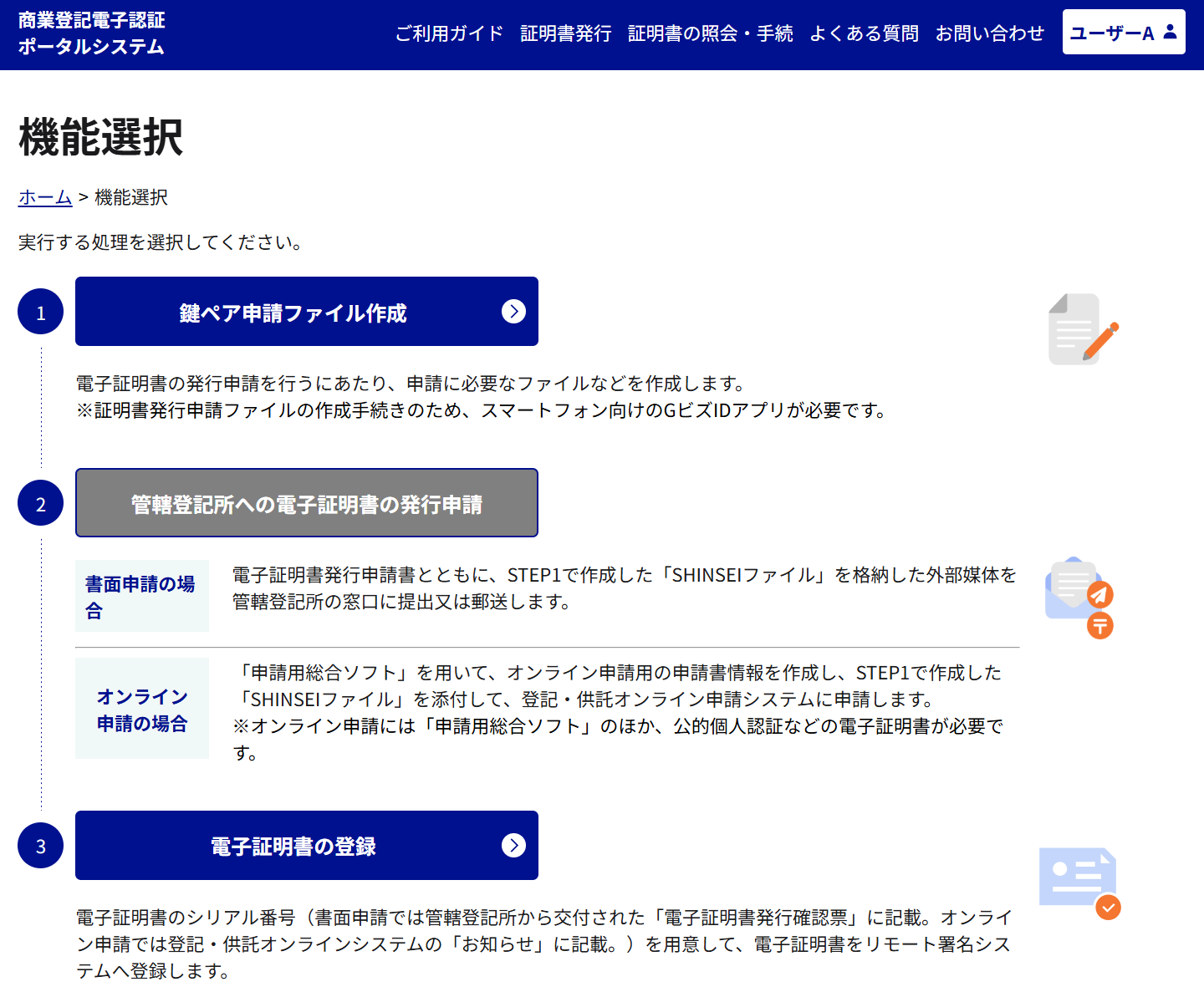
Step 1: Apply for and obtain a Commercial Registration electronic certificate
- Log in to the electronic certification portal for commercial registration (tentative name) on the website at gBizID and prepare the application.
- Create the files necessary to apply for the issuance of a Commercial Registration electronic certificate
- When creating a file, link it in advance to the gBizID application (smartphone application) that will be used when actually granting a digital signature
- Apply to the Registry Office (Legal Affairs Bureau) for issuance of a Commercial Registration electronic certificate
- There are 2 ways to apply for issuance. Both of them are the same as the current way of application.
- By submitting a written document
- Online submission using the Integrated Application Software
- There are 2 ways to apply for issuance. Both of them are the same as the current way of application.
- At the electronic certification portal for commercial registration, enter the serial number notified by the registry office and acquire the commercial registration electronic certificate
The following is a screen image of the electronic authentication portal for commercial registration (tentative name). Please refer to it as well.
Step 2: Grant an electronic signature with a commercial registration certificate
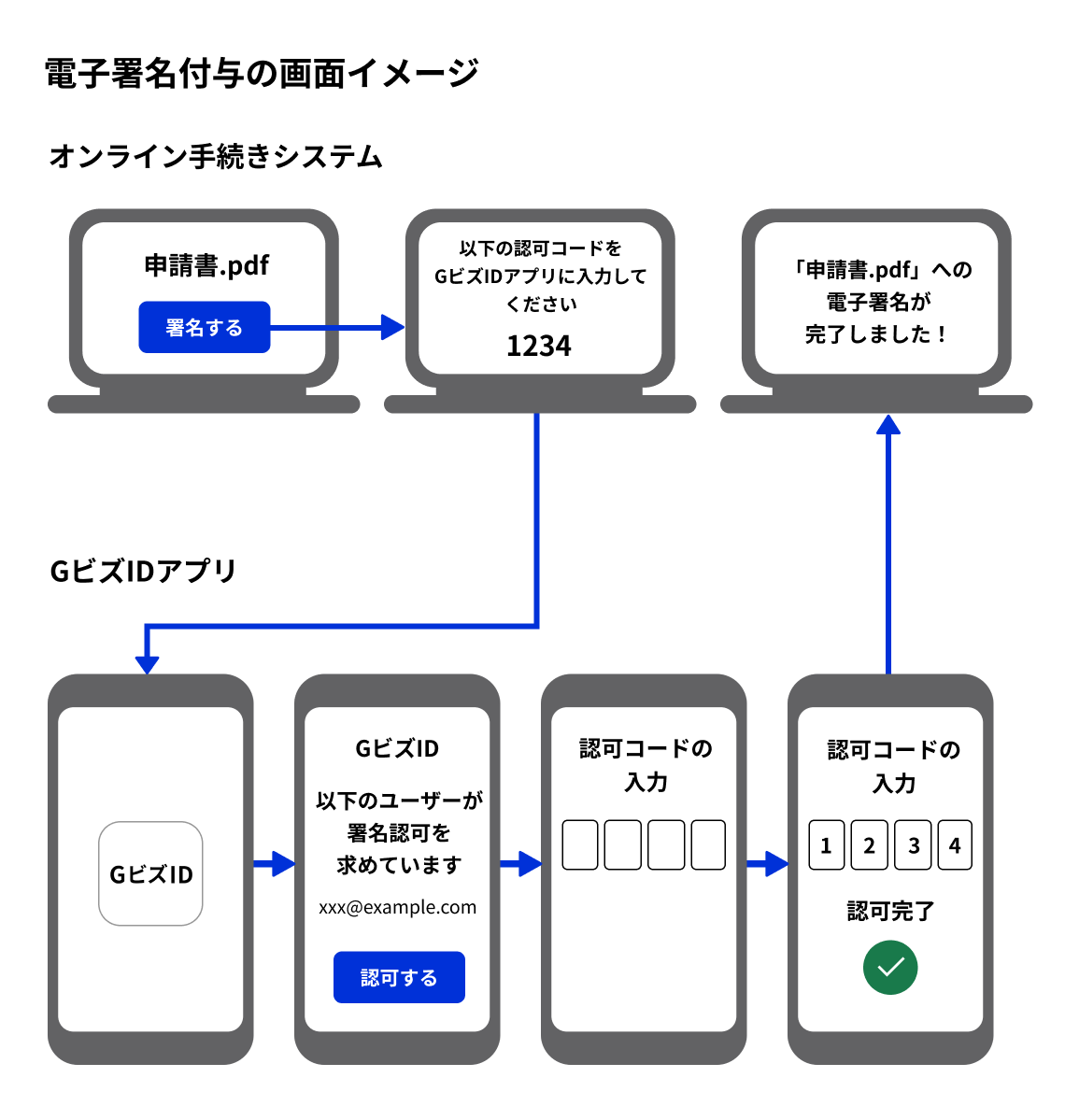
- Access the online procedure system on the browser
- Select a file to which an electronic signature is to be added during application procedures, etc.
For example, a button such as "A digital signature of the commercial registration electronic certificate is given to this file" is pressed. - A four digit number called an authorization code appears on the screen
- Open the gBizID app (smartphone app) linked in 1 of step 1 and enter the authorization code on the screen.
- Signed
Please refer to the following screen shot when electronic signatures are granted after the introduction of the remote signature system.
5. Q&A
- For Q & A and inquiries about remote signatures for commercial registrations and for related software developers, please visit the Ministry of Justice website " Commercial Registration Remote Signatures Special Page ".