
We are pleased to announce the start of operation of the remote signature method of commercial registration electronic certificate
- Published:
From Tuesday, July 21, 2026, Ministry of Justice and Digital Agency will introduce a remote signing method for the commercial registration of electronic certificate in cooperation with gBizID. This will enable digital signatures to be granted online using the gBizID app on smartphones. In addition, the preparation for the issuance of electronic certificate and its management will be available on a browser-based website. The signing key (and the commercial registration of electronic certificate) required for digital signatures will be changed from a file-based format to a secure cloud-based format. The background to the introduction is the resolution of issues related to usage environments and security in the current local signing method (file-based format). The changes and Q & A following the introduction are as follows.
Table of Contents
- 1. Background of the Introduction of the Remote Signature System
- 2) : What will change with the introduction of remote signatures?
- 3. How to Use the Remote Signature Method
- 4.Q&A
- 5. Reference
1. Background of the introduction of the remote signature method
Commercial registration electronic certificate is a electronic certificate that certifies that users are representatives of companies and corporations through online applications for administrative procedures and electronic contracts between companies and corporations. It has the same function as a paper certificate of the seal impression of a company or corporation. Electronic signatures using commercial registration electronic certificate are currently based on a method called local signature, and can be broadly divided into the following two forms.
- (1) File form: A form in which the signature key (and the commercial registration electronic certificate) is stored in a computer file
- ② IC card format: A format in which the signature key (and the commercial registration electronic certificate) is stored in a security chip such as an IC card so that it cannot be taken out.
Of these, (1) file formats have the following issues.
1. Restrictions on the Usage Environment
- Since signing keys are stored as electronic certificate files in the form of files on users' PCs, the environments in which procedures can be performed are limited. For example, if a electronic certificate file is stored on an office PC and a user goes on a business trip, the user cannot sign the file unless he or she brings the PC with him or her.
2. Security issues
- Because electronic certificate files can be duplicated, proper management can be difficult. If not managed properly, in the worst case scenario, electronic certificate files containing signing keys and their passwords could be exposed and used by third parties.
The solution to these file format issues is to introduce a remote signature scheme.
2. What Will Change with the Introduction of Remote Signature?
The following points are changed by the introduction of the remote signature method.
- The form of storage of the signing key (and the commercial register electronic certificate) will change
- Signing keys are no longer stored in the form of electronic certificate files on user PCs. Instead, they are stored on cloud hardware that is under strict control, thus improving security.
- The preparation and management of electronic certificate publication can be done through a browser, which reduces the management burden on users.
- Electronic signature can be granted online.
- Restrictions on the usage environment will be eliminated, and it will be possible to do it online from anywhere through smartphones, etc.
- In collaboration with gBizID
- Users must obtain a gBizID account.
- You will be able to authorize signatures (approve the granting of electronic signatures) in the gBizID app on your smartphone.
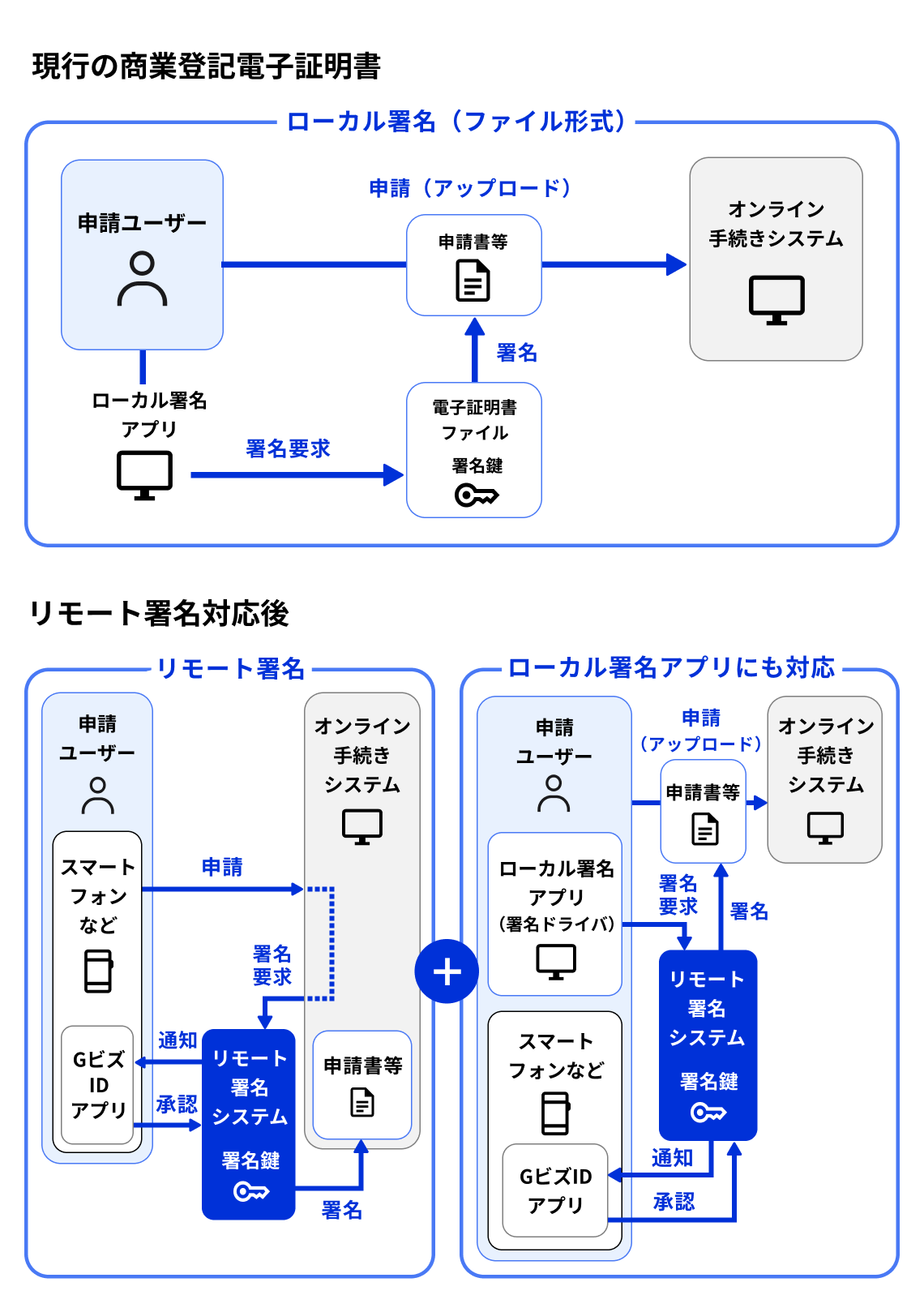
Figure 1 compares the current and future flow of granting electronic signatures using the Commercial Registration electronic certificate, both of which assume the case of granting electronic signatures of the Commercial Registration electronic certificate for applications submitted through online administrative procedures.
- Current case
- The requesting user shall attach a digital signature to the application form, etc. using a separate Local Signature App (software for local environments). As a specific technical mechanism at this time, Local Signature App shall attach a digital signature to the application form using the signature key of the electronic certificate file stored in the form of a file on the computer.
- Finally, the applicant user submits the application form, which has been granted an electronic signature, by uploading it to the online procedure system.
- After introduction of remote signature method
- An applicant user selects an application form, etc. to which an electronic signature is to be attached and attaches the electronic signature. As a specific technical mechanism for this, the online procedure system requests the remote signing system to sign the application. Upon receiving the request, the remote signing system attaches the electronic signature online using the applicant user's signature key on the cloud, after obtaining approval from the gBizID app of the applicant user. Since the signature key is stored on the cloud, the attachment of the electronic signature is completed online without using the local Signature App.
- Remote signing also works with local Signature App
- In addition, even after the introduction of the remote signing system, in order to make it possible to grant digital signatures using the local Signature App in the same way as before, we will provide a signing driver that supports the remote signing method.
- When using a signature driver, an applying user shall open the Local Signature App and grant a digital signature to an application form, etc. However, in this case, unlike the current system, a request for signatures from the Local Signature App shall be made to the remote signature system through the signature driver. Then, the applying user shall upload the application form, etc. to which the digital signature has been granted to the online procedure system and submit it.
Below is an illustration of the above-mentioned contents about the mechanism of granting digital signatures of the Commercial Registration electronic certificate in the online procedure (Figure 1).
3. How to Use the Remote Signature Method
Here is an example of how to sign the commercial registration electronic certificate in the remote signing system.
- 1 Apply for and obtain a commercial registration electronic certificate
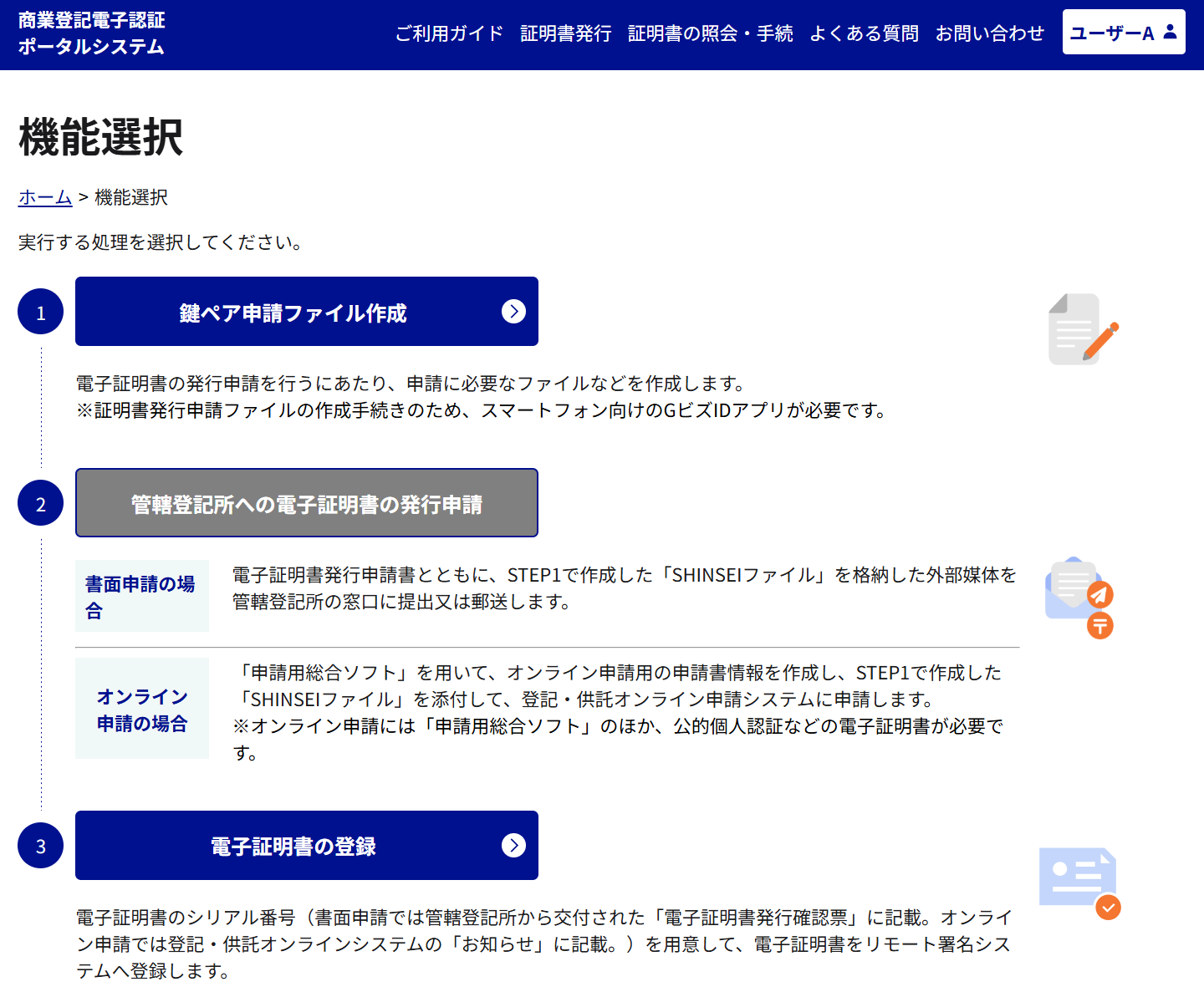
- 1.1 Log in to the electronic certification portal for commercial registration (tentative name) (Figure 2) on the website in gBizID and create the files necessary to apply for the issuance of commercial registration electronic certificate. At this time, link the gBizID application (smartphone application), which will be used when actually granting electronic signatures, in advance.
- 1.2 Apply to the registry office (Legal Affairs Bureau) for the issuance of a commercial registration electronic certificate. The issuance application shall be made by (1) submitting the document or (2) submitting it online using the "Comprehensive Application Software" as before.
- 1.3 Enter the serial number notified by the registry office on the electronic certification portal for commercial registration to obtain the commercial registration electronic certificate (In addition, the commercial registration electronic certificate obtained through the portal can also be viewed and managed on the portal).
The proposed screen image of the commercial registration electronic authentication portal is shown below (Figure 2).
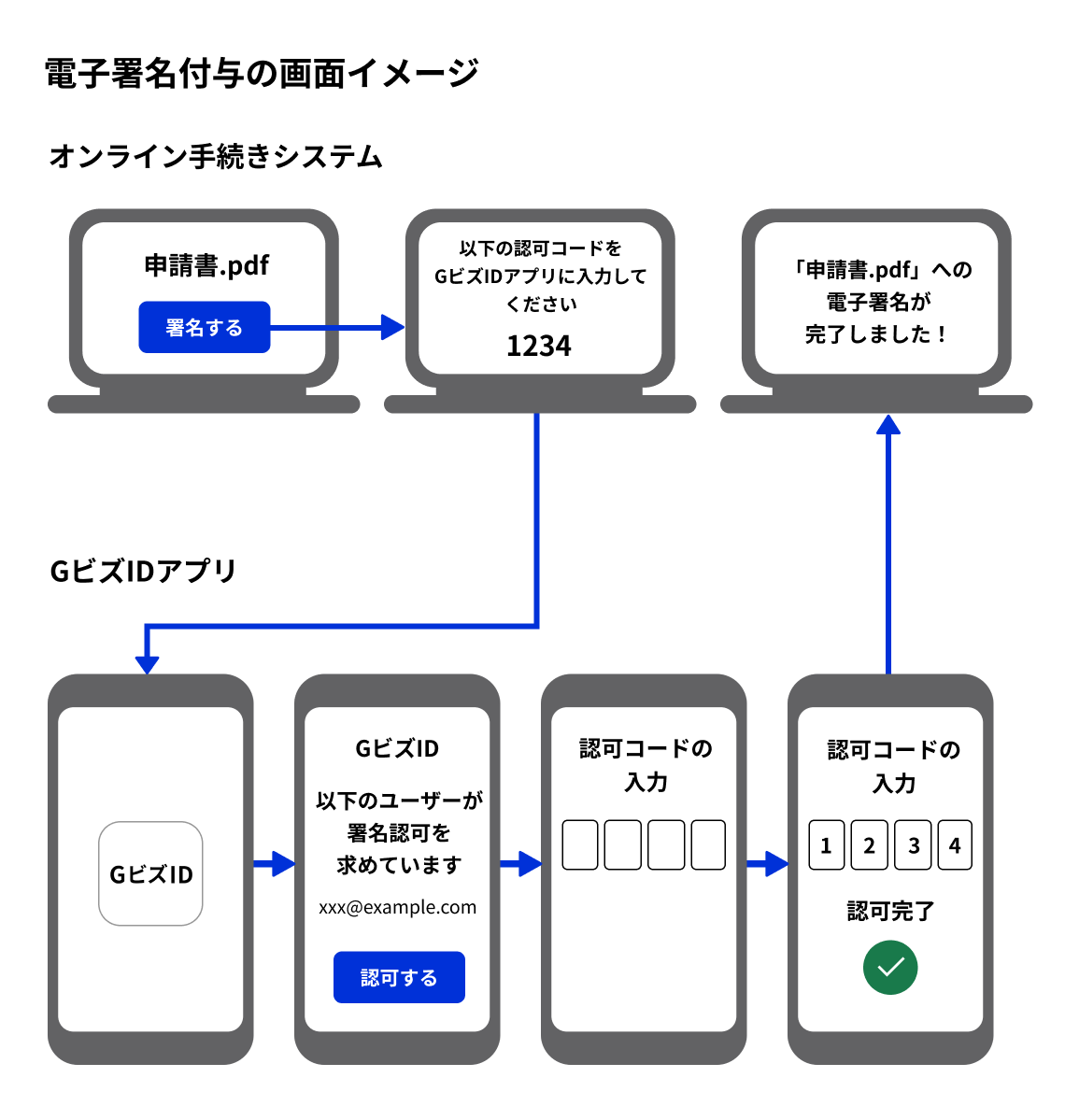
- 2 Granting a digital signature using the commercial registration electronic certificate (Figure 3)
- 2.1 Access the online procedure system on the browser and select a file to be granted electronic signatures in application procedures, etc. For example, press a button such as "Grant electronic signatures of Commercial Registration electronic certificate to this file."
- 2.2 A four digit number called the Authorization Code appears on the screen.
- 2.3 Open the gBizID application (smartphone application) linked in 1.1 and enter the authorization code on the screen.
- 2.4 Signature is completed.
The figure below shows a screen image when electronic signatures are granted after the introduction of the remote signature method (Figure 3).
4. Q&A
General
Q. When will the Commercial Registration Remote Signature (Remote Signature Method and Commercial Registration Electronic Authentication Portal) be introduced?
A. 2026 on Tuesday, July 21, 2026.
Q. Is the signing key safe with the new method (remote signature method)?
A. Yes, with the remote signing method, the signing key is kept strictly on hardware in the cloud. Concretely, the electronic certificate is generated, stored and managed by a modern hardware-based security module, which is physically protected and has a tamper-proof (tamper-proof and physically tamper-proof structure) and access-control function to prevent unauthorized access and tampering, as well as a mechanism to guarantee data confidentiality and integrity.
Q. What are the benefits of the remote signature method?
A. By securely managing signature keys in the cloud, electronic signatures can be granted regardless of the user's PC environment.
Q. How is it different from the business operator signature type (witness signature) electronic signature service?
A. Business signature-type services shall be digitally signed with the business's signing key. For remote signing with the business registration electronic certificate, the digital signature shall be signed with the user's signing key.
Q. Can the gBizID App be used with a signed license in a electronic certificate other than the electronic certificate with Commercial Registration?
A. Not available for signature authorization outside the electronic certificate of Commercial Registration.
Q. What is Remote Signing driver software?
A. This is an optional function that enables you to digitally sign locally as before. By installing the remote signing driver software, you can digitally sign locally using, for example, Adobe Acrobat Reader (Windows only).
If the administrative service performing the online application supports remote signing, you do not need to install it.
For users
Q. Will a electronic certificate that is currently in use become invalid? How long can it be used?
A. Your current Commercial Registration electronic certificate (electronic certificate in its existing file format) will be available for use after the introduction of Remote Signing (i.e. after July 2026) until the expiration of the Remote Signing period. Please note that the Commercial Registration Visa can only be used for local signing.
Q. (As an example) The commercial registration electronic certificate for existing file formats is valid from January 2027, even after the start of remote signing (July 2026). Is it possible to use this electronic certificate with remote signing?
A. The commercial registration electronic certificate in the existing file formats cannot be used with the remote signing method. When signing electronically using the remote signing method, it is necessary to obtain a new commercial registration electronic certificate using the commercial registration electronic certification portal after the start of operation of the remote signing method (July 2026).
Q. Will Ministry of Justice's "Electronic Certification Software for Commercial Registration" stop working?
A. The "Commercial Registration Electronic Authentication Software" will continue to be provided and supported for a certain period of time even after the introduction of the Commercial Registration Remote Signature. For details, please check the Commercial registration How to use remote signatures (Ministry of Justice special page).
Q. Is it possible to receive a electronic certificate in the form of a file even after the start of the remote signing operation (July 2026)?
A. It is possible. By using the application software (charged) provided by private sector in place of the "Electronic Certification Software for Commercial Registration", it is possible to issue a commercial registration electronic certificate in the form of a file.
Q. Currently, I use Signature App (Adobe Acrobat Reader, etc.) to sign documents using electronic certificate, which is in the form of a file. Will the introduction of remote signing change the way I use it?
A. You can continue to use the current method if the commercial registration electronic certificate in the existing file format is within the expiration date. If you wish to use the remote signing method, you can acquire a new commercial registration electronic certificate using the commercial registration electronic certification portal and download a remote signing driver software (free of charge).
Please note that Signature App may need to take action.
Can I use an IC card?
A. You can continue to use the service provided by private sector that allows you to store your commercial registration electronic certificate in an IC card (fee required). However, remote signing cannot be used with electronic certificate in IC card format.
Q. Are there any necessary procedures for migrating to the remote signature method?
A. In place of the conventional electronic certification software for commercial registration, you will need to log in to the website provided on your browser (available from July 2026) and prepare your application. You will need a gBizID account to log in, so please consider obtaining one in advance. You will also need a smartphone with the gBizID app installed and an Internet connection.
Q. What do I do if I have questions about the migration?
A. Please check the Commercial registration How to use remote signatures (Ministry of Justice special page).
Q. Will the introduction of the remote signatures method change the way to apply for the issuance of a Commercial Registration electronic certificate?
A. In the past, it was necessary to create a file required when applying for issuance through the "Electronic Certification Software for Commercial Registrations," but after the introduction of the remote signature method, it will be changed to a method using the "Electronic Certification Portal for Commercial Registrations (tentative name)," which is a website. On the other hand, when applying for issuance to a registry office (Legal Affairs Bureau), you will be able to submit (1) a document or (2) an online document using the "Comprehensive Application Software."
For developers of related software
Q. What is required to support remote signing?
A. Remote signatures are provided by the Remote Signature API method and the Remote Signature Driver method. Consider supporting the Remote Signature API method for web services and the Remote Signature Driver method for software in a local environment. Note that the Remote Signature API method is for the time being available only for administrative services.
Q. I offer electronic certificate to sign with Signature App in the form of a file. How do I prepare for remote signing?
A. By using the Remote Signing driver software, you will be able to use CAPI / CNG in Windows environments. Please consider renewing your Signature App.
Q. Where can I find the specifications for the remote signing API and the technical specifications for the signing driver?
A. Please check the Commercial registration How to use remote signatures (Ministry of Justice special page).