
Policy evaluation (by FY 2022)
- Last Updated:
1. What's New
- The Third Expert Meeting on Policy Evaluation of Digital Agency in FY 2022 was held in .
* Since 2023, the system has been unified to "Policy Evaluation and Public Administration Project Review."
2. Overview
Digital Agency conducts policy evaluations based on the 2001 "Act on Policy Evaluation by Administrative Organs" (Act No. 86 of 2001). 2001
The objectives of policy evaluation are to identify and analyze the effects of policies implemented by individual ministries and agencies, and to conduct ex-ante and ex-post evaluations. The objectives are to plan, implement and manage projects in a planned and efficient manner, and to reflect the results in the formulation of future policies. The aim is to contribute to the regular review and improvement of the content of projects.
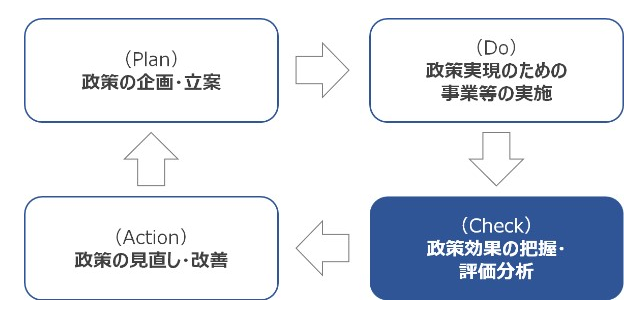
Image of Policy Implementation by PDCA Cycle
In Digital Agency, the cycle consists of Plan (policy planning), Do (project implementation), Check (policy assessment and evaluation), and Action (policy revision and improvement).
3. Planning
Digital Agency's Basic Plan for Policy Evaluation and its Implementation Plan
- Basic Plan for Digital Agency Policy Evaluation (PDF / 176 kb)
- Implementation Plan for the Fiscal 2022 Digital Agency Policy Evaluation (PDF / 54 kb)
4. EIS etc.
Results of Policy Evaluation and Reflection in Policy Making
5. Advisory Council
- Outline for Establishment of the Advisory Council on Policy Evaluation of Digital Agency (PDF / 48 kb)
- The First Digital Agency Policy Evaluation Expert Meeting in FY 2022
- The 2nd Digital Agency Policy Evaluation Expert Meeting in FY 2022
- The 3rd Digital Agency Policy Evaluation Expert Meeting in FY 2022
- (Reference) Policy Evaluation Portal Site (Ministry of Internal Affairs and Communications)
6. Opinions and Requests
Please contact the following for opinions and requests regarding policy evaluation.
In charge of Digital Agency Policy Evaluation
- Tokyo Garden Terrace Kioicho 20 f, 1-3 Kioicho, Chiyoda-ku, Tokyo 102-0094
- Phone: 03 4477 6775
- Email: seisakuhyouka _ atmark _ digital. go. jp
*"@" is displayed as "_ atmark _" to prevent spam mail. When you send mail, please change "_ atmark _" to "@" (one byte).